With my (beloved) Moto Z3 Play out of action while someone on this planet finds me a replacement SIM Card Tray (sigh) I've reverted to using the Moto Z2 Play and thought I'd take a moment to revisit the reasons why, when I first 'upgraded', the newer experience was 'better' and if that's still so.
The blog post I made (https://goo.gl/ZWRAHu) when I executed the change was split down into 11 points, so I'll just quickly review where I'm at with them...
1. The Audio-Out Socket being 3.5mm on the Z2 Play I haven't used since I switched back, so conclude, as I did at the change, that this omission is meaningless for me personally. I haven't even, beyond testing, used the Z3 Play's USB-C Audio-Out either.
2. No Dolby Audio I thought was going to be a bad thing, but actually, I think that the built-in speaker in both of these units is good enough for casual use anyway - and when the JBL SoundBoost is clacked on the back, there are loads of audio-control options via the device and also the dedicated JBL App. So yes, better to have than not, but no real issue.
3. The 18:9 6.1" Screen on the newer model is certainly better than the old - but only simply because, with the units being the same physical size, you get more screen on the front! Who'd want less screen (for the same size device) than more?! There's no stupid 'notch' (well done again Moto) and just the right amount of chin and forehead for gripping/resting thumb etc. Going back to the 16:9 on the older model is no deal-breaker, just feels like a bit of wasted space - though that does bring us to the next point...
4. The side-mounted fingerprint scanner was my biggest challenge switching to the Z3 Play, I said back then. I thought Moto had got it right with the unique FPS chin placement with long-press for screen-off and touch for on - particularly useful on the table/desk - and yes, less so with the side-mounted. Agreed, taking the device out of the pocket is fine, the Z3 Play's FPS is right under the thumb and ready to go, but not so on the test. It's manageable - but not as good. Still, that extra screen had to come from somewhere for those who were crying out for it. The 'always on' arrangements also help that situation - waving a hand over the screen of both brings up battery, clock, day, date and quick-access to any Notifications including slide to delete. So I get away with it. Going back to the Z2 Play makes me realise that I would probably prefer it on the front, somehow.
5. Snapdragon Chipset increment - don't notice a thing. They both work perfectly fast enough and the benefits of the 636 over the 626, if mostly power efficiency, are lost on me as I always have a battery on the back (unless using another Mod.) and notice no difference.
6. Android 8.1 on the newer model does give a nice squishy feeling inside shallow people like me, but actually, the 8.0.0. on the older model makes very little difference indeed. In actual fact, as I write, the Z2 Play has October Google Security Update whilst the Z3 Play 'only' has September! So the rollout of updates is a bit hit and miss, though it's great to see phone makers at last taking it seriously. So that's no deal-breaker.
7. The navigation slider is genius and worth the upgrade money to the newer phone alone! As I was saying, it's better than anyone else's implementation including various options on various devices including Google's own Pixel. The difference is that the swipe-left is Back. With other variations, the swipe-left for Back seems to be gone in lieu of either on-screen buttons, often right up the top, full-screen swipes or context based appearance of a Back button 'when needed'. Of course, if you don't like it (and I defy anyone to not!) you can switch back to the usual 3 buttons. I do wish though that the long-press was screen-off and the extra-long press was for the Assistant. That could have been done, but wasn't. The Z2 Play fails here as the Home button (capacitive) when swipe-gestures are switched on, gets confused and is difficult to use. A huge point here for the Z3 Play - and would now be a deal-breaker!
8. I've made use of the camera, but most here will know that I'm not a big user so anything will do within reason! The camera of the old would have done me fine instead of the few extra bells, whistles and speed of the new.
9. Glass instead of metal being on the back is totally insignificant for me, as I said before. I use Mods!
10. The supplied Battery Mod with the Z3 Play has hardly been used. Waste of money in the box. Should have given me a cash discount - as I said before. It is in the kit bag, but so also are the other four that I already had!
11. Fat/thin device, 1mm or less, don't notice!
So the long and the sort of it is that yes, there are a couple of fabulous benefits with the Z3 Play but actually, whether a person would consider it worth upgrading for is questionable. If a user experiences that navigation slider control, they might be convinced. I was. And it's probably the only reason why I'd find it difficult to go back. When you've used it for a while, you really don't want any other navigation arrangement. IMHO :-)
Tuesday, 30 October 2018
Thursday, 25 October 2018
Samsung Galaxy S9 Plus - One Week On!
I've been trying really hard this week to like (or even love) the Samsung Galaxy S9+ since I bought it from Steve Litchfield and feel that at last I'm getting somewhere - by the power of the open Android system and options. But it's taken a lot of learning, messing about, downloading, turning things off, uninstalling things, saying NO to Samsung regularly, disabling things, force-stopping things and not letting Samsung treat me like an OAP with no idea what they're doing!
It’s been very difficult forcing myself, but it is the first time that I've persevered, mainly for the same reason as Steve Litchfield did - the market-leading array of hardware features and flexibility on offer. Here, I offer my thoughts - no, not a review, as that's been done a thousand times - but the things that stand out for me, what I've found difficult and how I've negotiated the transition from pure vanilla - and what compromises that I just have to accept along the way and to now live with.
Launcher
First things first, I can't stand the Samsung Homescreen/Launcher thing, so my paid-up Nova Prime is placed squarely centre, backup restored, making it look like a Pixel. One glaring exception, as Samsung won't let the casual user change Navigation Buttons, was to go back to the Samsung Launcher, sign up for Samsung Themes, Download and Apply the 'Pixelize' Theme, then change the Launcher back to Nova. Voila - the Pixel-style Navigation Buttons are present!
Bixby
Next job, get rid of Bixby, disable the button and turn it all off. From what I can see, you can't do all this unless you sign up for a Samsung Account because you can't get to the Bixby Settings until you do. You can then swipe-right, get to the Settings and turn everything off. Then, using the Samsung Launcher again, long-press the homescreen until the 'pages' minimise, then swipe-right and throw the switch to turn off the 'left of homescreen' Bixby Page. All done. Bixby button = furniture. Go back to Nova Launcher. Phew!
HDMI-Out
I've been trying hard for months into years now to get a reliable HDMI-Out thing going so that I can play a huge amount of video content stored on my phone, out and on to my TV, without broadband or any kind of connection to the internet. I've tried all sorts of devices in order to achieve this. Some go some way towards this, some connect well, some don't (even when they are supposed to), some don't do it at all, some will let you do it but won't let you charge at the same time (even with a dongle), some don't have expandable storage - and so on. The fight has been a long one! The outcome is that Samsung, by a margin, come closest. HDMI-Out for stored media, charging allowed whilst playing, microSD Card storage and no connection to the internet needed. If it hadn’t been for this core demand on my part, I would certainly have given up. It has driven me to keep at it! The only problem now with this setup is that phone can't be used for anything else whilst playing - but I guess that's not Samsung's fault, rather physics!
Speakers
The speakers produce good quality sound which is very loud, rich and bassy (as much as a phone can be) certainly lounge-filling output. As far as I'm concerned, the Razer Phone still holds the crown (overall) with the Dolby Atmos employed - but turn that off, and the Samsung snatches it back! Samsung's output here is very good even with the Dolby turned off, but when that is turned on, it notches the quality up, maybe at the cost slightly of top volume. 'Auto' setting seems to gain the best results for most music, film and spoken word in my tests. The stereo separation and 5.1 surround produced by Razer's true stereo speakers is not matched here on the Samsung. It's very good and spatial effect is good, but not as good. The sound is fired out of the Samsung from the ear-speaker one end and the bottom of the device from the other, like many manufacturers are doing. It's not the same, however you egg it up, but very few people would be dissatisfied with the output here.
Other Audio
Unlike the Razer, Samsung have retained the 3.5mm audio-out socket, so headphones can be plugged in, without any dongle, 32-bit audio built-in. A decent set of headphones sound phenomenal (to my ears) as one might expect. The Razer needs a dongle to get this out, firstly as it has no 3.5mm socket but also because the clever stuff is in the supplied dongle. Samsung's 'Adapt Sound' is a process that they (optionally) lead you through - a series of beeps, like a hearing test at hospital, asking when and if you can hear what - then offers a sound profile designed for the user's hearing. We've seen this before with the likes initially of HTC - and I'm not sure if I can the difference! Personally, I really very rarely use headphones so it matters not one whit, but from my younger days I can understand the joys of a great personalised sound experience. Probably why my ears are knackered now!
Screen
The Super AMOLED screen is gorgeous here. I have it set to 1080p instead of 1440, which is perfectly good for my eyes, and I'd make the case for saying anyone's! It's bright and vibrant, colours pop - even before the user plays with preferred settings. No complaints there, except maybe for the hit on battery. Talking of which, the Always On screen is a peach to use and echoes plenty of notifications, battery status, clock, day, date, what's playing - long-press the clock for on-the-fly changes and alterations to the brightness of that display. Double-tap on each item to see what is going on, depending on what you've set. Fabulous stuff. Bettered only I think by LG.
Power
The battery is 3500mAh. At best I'd say it is mediocre, but to some degree it's saved by Qi pads being littered around the place. To get to bedtime, for me anyway, is a struggle with my average use through the day. Of course, everyone's mileage will vary depending on how they use the phone. Some lighter users will have no problem, but heavy users will be frustrated when they have to charge by teatime.
Settings Abortion
Samsung have completely screwed Settings, all moved around, I don’t know where anything is, usually my target is buried under layers and layers - most times I just have to go to the Search function to find anything. I think this is actually the most annoying part of the whole experience - that Samsung tries to automate everything and give the user little input or control. I want to know what’s going on and have control myself. Some things can be turned off to stop it but some can’t. “Do not show again” options in Notifications seem to often be ignored after a phone boot. Constantly picking at the user. Pick, nag, pick! Every time you lift up the phone it's suggesting something or asking you if you want to do this or that. Annoying. LEAVE ME ALONE! How about 'Download Booster' mixing 4G and Wifi? Samsung Cloud prompts and Samsung Account everywhere you turn - pop up reminders not going away a week later, Keyboard control in Language and Input, inside “General Management” why? Battery control inside “Device Maintenance” why? Why does stuff have to be buried? Software Update nowhere near Software information - two completely different branches on the Menu structure. About Phone is where some other Battery information lives! Yes - the most confusing part of this phone is not what it does but how these Settings Menus are structured. Stupid!
Software
Talking of software, this phone is stuck on Android 8.0.0. - not even 8.1 - though September 2018 Security is present, so not too far behind for that. I know that Samsung have an awful lot more to ensure works than most other more Vanilla manufacturers - so, yes, another good reason not to festoon it with stuff that nobody wants in the first place - and that will cause delays in updates! Yeah, I know, updates are not really that important - and manufacturers are getting better at this - but Samsung seem to dwell within a reputation that reflects slower than most updates to the main OS. Android 9 Pie is promised 'soon' - but that's what everyone says! We want deeds, not words!
Biometrics
The controls of biometics, from registration to execution are quite superb. Quick and easy registration of Iris, Face and Fingerprint, then flawless recognition always without fail every time, using a combination of any of the three to get you in and working as quick as a flash. Beautifully done.
Samsung Apps
Much like the Sony counterpart, the Samsung Video Player app is excellent and well worth using over other offerings, especially Google's cludge. The Samsung Music app not really needed. It's basic and does nothing more than Google Play Music. There's an array of pointless doubling-up of Apps supplied by Google - Clock, Calendar, Email, Contacts, Gallery, Messages, My Files, Phone - all of which could just not exist - and bring nothing to the party except disintegration from the smooth running of Google's core PIM functionality. During Setup you can now opt out of most of the other Samsung gunge, which is a step forward, though having to leap past warnings aplenty that the phone won’t work best unless you agree to allow it etc. Then the phone keeps reminding you every few days about what you’re missing out on. Annoying! I do understand that some people will want to use the Samsung stuff like Health and Note taking apps etc. but if you've got this far reading, you'll know that I certainly am not interested and the more that apps can be placed in the Play Store and not pre-installed, like Facebook and LinkedIn are here too, for example, the closer we'll get to a pure Android experience and into the bargain, get faster updates!
Thoughts
Anyway, these are a few scattered thoughts from my first week of use taking Samsung seriously and trying hard to make it work, unlike previous attempts, if I'm honest. My SIM Card is still in the phone, which is a record! On balance, the benefits outweighing the drawbacks. For now.
It’s been very difficult forcing myself, but it is the first time that I've persevered, mainly for the same reason as Steve Litchfield did - the market-leading array of hardware features and flexibility on offer. Here, I offer my thoughts - no, not a review, as that's been done a thousand times - but the things that stand out for me, what I've found difficult and how I've negotiated the transition from pure vanilla - and what compromises that I just have to accept along the way and to now live with.
Launcher
First things first, I can't stand the Samsung Homescreen/Launcher thing, so my paid-up Nova Prime is placed squarely centre, backup restored, making it look like a Pixel. One glaring exception, as Samsung won't let the casual user change Navigation Buttons, was to go back to the Samsung Launcher, sign up for Samsung Themes, Download and Apply the 'Pixelize' Theme, then change the Launcher back to Nova. Voila - the Pixel-style Navigation Buttons are present!
Bixby
Next job, get rid of Bixby, disable the button and turn it all off. From what I can see, you can't do all this unless you sign up for a Samsung Account because you can't get to the Bixby Settings until you do. You can then swipe-right, get to the Settings and turn everything off. Then, using the Samsung Launcher again, long-press the homescreen until the 'pages' minimise, then swipe-right and throw the switch to turn off the 'left of homescreen' Bixby Page. All done. Bixby button = furniture. Go back to Nova Launcher. Phew!
HDMI-Out
I've been trying hard for months into years now to get a reliable HDMI-Out thing going so that I can play a huge amount of video content stored on my phone, out and on to my TV, without broadband or any kind of connection to the internet. I've tried all sorts of devices in order to achieve this. Some go some way towards this, some connect well, some don't (even when they are supposed to), some don't do it at all, some will let you do it but won't let you charge at the same time (even with a dongle), some don't have expandable storage - and so on. The fight has been a long one! The outcome is that Samsung, by a margin, come closest. HDMI-Out for stored media, charging allowed whilst playing, microSD Card storage and no connection to the internet needed. If it hadn’t been for this core demand on my part, I would certainly have given up. It has driven me to keep at it! The only problem now with this setup is that phone can't be used for anything else whilst playing - but I guess that's not Samsung's fault, rather physics!
Speakers
The speakers produce good quality sound which is very loud, rich and bassy (as much as a phone can be) certainly lounge-filling output. As far as I'm concerned, the Razer Phone still holds the crown (overall) with the Dolby Atmos employed - but turn that off, and the Samsung snatches it back! Samsung's output here is very good even with the Dolby turned off, but when that is turned on, it notches the quality up, maybe at the cost slightly of top volume. 'Auto' setting seems to gain the best results for most music, film and spoken word in my tests. The stereo separation and 5.1 surround produced by Razer's true stereo speakers is not matched here on the Samsung. It's very good and spatial effect is good, but not as good. The sound is fired out of the Samsung from the ear-speaker one end and the bottom of the device from the other, like many manufacturers are doing. It's not the same, however you egg it up, but very few people would be dissatisfied with the output here.
Other Audio
Unlike the Razer, Samsung have retained the 3.5mm audio-out socket, so headphones can be plugged in, without any dongle, 32-bit audio built-in. A decent set of headphones sound phenomenal (to my ears) as one might expect. The Razer needs a dongle to get this out, firstly as it has no 3.5mm socket but also because the clever stuff is in the supplied dongle. Samsung's 'Adapt Sound' is a process that they (optionally) lead you through - a series of beeps, like a hearing test at hospital, asking when and if you can hear what - then offers a sound profile designed for the user's hearing. We've seen this before with the likes initially of HTC - and I'm not sure if I can the difference! Personally, I really very rarely use headphones so it matters not one whit, but from my younger days I can understand the joys of a great personalised sound experience. Probably why my ears are knackered now!
Screen
The Super AMOLED screen is gorgeous here. I have it set to 1080p instead of 1440, which is perfectly good for my eyes, and I'd make the case for saying anyone's! It's bright and vibrant, colours pop - even before the user plays with preferred settings. No complaints there, except maybe for the hit on battery. Talking of which, the Always On screen is a peach to use and echoes plenty of notifications, battery status, clock, day, date, what's playing - long-press the clock for on-the-fly changes and alterations to the brightness of that display. Double-tap on each item to see what is going on, depending on what you've set. Fabulous stuff. Bettered only I think by LG.
Power
The battery is 3500mAh. At best I'd say it is mediocre, but to some degree it's saved by Qi pads being littered around the place. To get to bedtime, for me anyway, is a struggle with my average use through the day. Of course, everyone's mileage will vary depending on how they use the phone. Some lighter users will have no problem, but heavy users will be frustrated when they have to charge by teatime.
Settings Abortion
Samsung have completely screwed Settings, all moved around, I don’t know where anything is, usually my target is buried under layers and layers - most times I just have to go to the Search function to find anything. I think this is actually the most annoying part of the whole experience - that Samsung tries to automate everything and give the user little input or control. I want to know what’s going on and have control myself. Some things can be turned off to stop it but some can’t. “Do not show again” options in Notifications seem to often be ignored after a phone boot. Constantly picking at the user. Pick, nag, pick! Every time you lift up the phone it's suggesting something or asking you if you want to do this or that. Annoying. LEAVE ME ALONE! How about 'Download Booster' mixing 4G and Wifi? Samsung Cloud prompts and Samsung Account everywhere you turn - pop up reminders not going away a week later, Keyboard control in Language and Input, inside “General Management” why? Battery control inside “Device Maintenance” why? Why does stuff have to be buried? Software Update nowhere near Software information - two completely different branches on the Menu structure. About Phone is where some other Battery information lives! Yes - the most confusing part of this phone is not what it does but how these Settings Menus are structured. Stupid!
Software
Talking of software, this phone is stuck on Android 8.0.0. - not even 8.1 - though September 2018 Security is present, so not too far behind for that. I know that Samsung have an awful lot more to ensure works than most other more Vanilla manufacturers - so, yes, another good reason not to festoon it with stuff that nobody wants in the first place - and that will cause delays in updates! Yeah, I know, updates are not really that important - and manufacturers are getting better at this - but Samsung seem to dwell within a reputation that reflects slower than most updates to the main OS. Android 9 Pie is promised 'soon' - but that's what everyone says! We want deeds, not words!
Biometrics
The controls of biometics, from registration to execution are quite superb. Quick and easy registration of Iris, Face and Fingerprint, then flawless recognition always without fail every time, using a combination of any of the three to get you in and working as quick as a flash. Beautifully done.
Samsung Apps
Much like the Sony counterpart, the Samsung Video Player app is excellent and well worth using over other offerings, especially Google's cludge. The Samsung Music app not really needed. It's basic and does nothing more than Google Play Music. There's an array of pointless doubling-up of Apps supplied by Google - Clock, Calendar, Email, Contacts, Gallery, Messages, My Files, Phone - all of which could just not exist - and bring nothing to the party except disintegration from the smooth running of Google's core PIM functionality. During Setup you can now opt out of most of the other Samsung gunge, which is a step forward, though having to leap past warnings aplenty that the phone won’t work best unless you agree to allow it etc. Then the phone keeps reminding you every few days about what you’re missing out on. Annoying! I do understand that some people will want to use the Samsung stuff like Health and Note taking apps etc. but if you've got this far reading, you'll know that I certainly am not interested and the more that apps can be placed in the Play Store and not pre-installed, like Facebook and LinkedIn are here too, for example, the closer we'll get to a pure Android experience and into the bargain, get faster updates!
Thoughts
Anyway, these are a few scattered thoughts from my first week of use taking Samsung seriously and trying hard to make it work, unlike previous attempts, if I'm honest. My SIM Card is still in the phone, which is a record! On balance, the benefits outweighing the drawbacks. For now.
Monday, 22 October 2018
Samsung Galaxy S9 Plus - HDMI Media Server!
Well, I tried. Again! Samsung's Android interference is just too much for me. I shouldn't keep doing this, but I do. I never seem to learn, hate it and drive myself back to the clean purity of Pixel - or at least near-vanilla of the likes of Nokia, Motorola, Razer et al.
To be fair, I probably knew this when I bought the phone. What was driving me on was not the very good speakers (though not in the same class as the Razer), not the 128GB of built-in Storage, not the Qi Charging, not the 3.5mm Audio-Out Socket, but the faultless HDMI-Out which Samsung seem to do better than anyone else out there. Bar none.
I live my digital life off of Cellular Data. When I want to watch stuff on TV, I have to use terrestrial or pay to stream data across Vodafone or cook up some system whereby I can poach Wifi when I'm in it, save data to a device and then plug it in to my TV to watch it. I love watching films. By careful selection and waiting for bargains, my Google Play Movies collection is now up to 200, plus various TV Show series. At any time, I might fancy watching any of that - and I really want to watch it on my TV.
I've tried using the Projector Mod on my Moto Z-series phones, but it really isn't very good. It's very dull and needs pitch black to make it usable. Then there's the phaff of setting up a screen or white wall etc. So I soon got fed up with that solution. No, back to other phones.
The Nokia 8 Sirocco will output to HDMI with no problem, but it only has 128GB of storage and no microSD Card slot. The Razer Phone is supposed to output to HDMI but try as I might, I can't get it to work properly. It just freezes up. Into the bargain, the Nokia 8 Sirocco won't allow for charging on a Qi pad whilst anything is plugged into the USB-C socket. It suspends it. As it does, we've found out this weekend, with the LG V30.
So, you see - it seems that the Samsung phones are the only ones which tick all the boxes. The Galaxy S9+ has 128GB of Storage, microSD Card expansion, it allows charging on a Qi pad whilst it's playing and will hold all the data I want. It has become my entertainment centre in my pocket with a 400GB microSD Card I have 528GB. My Google Play Movies stuff takes about 400GB of that leaving me 128GB to play with for downloading Netflix/Amazon Prime Video/BBC iPlayer stuff as it comes along. I'm also able to download Pocket Casts video podcasts for offline viewing.
It's an expensive solution but I can't see a cheaper one for my particular use case - well, it could have been an S8, I guess - but strangely not an S7 - or a Samsung Tablet - and there's also future-proofing to consider. I have stripped all the software off the phone except the ones I can't take off and the ones needed for Media (obviously) and run the device in Airplane Mode all the time except for when I'm out poaching Wifi. It's clearly a waste of a great phone in many people's eyes, but I hate it as a phone anyway, so nothing lost, and it's doing a job - and if I do want to use it out and about, has decent enough speakers to watch stuff on the screen.
If the Razer starts playing ball and doing what it is supposed to I'll maybe think again, flog this and use that. But for the meantime, this is my solution!
To be fair, I probably knew this when I bought the phone. What was driving me on was not the very good speakers (though not in the same class as the Razer), not the 128GB of built-in Storage, not the Qi Charging, not the 3.5mm Audio-Out Socket, but the faultless HDMI-Out which Samsung seem to do better than anyone else out there. Bar none.
I live my digital life off of Cellular Data. When I want to watch stuff on TV, I have to use terrestrial or pay to stream data across Vodafone or cook up some system whereby I can poach Wifi when I'm in it, save data to a device and then plug it in to my TV to watch it. I love watching films. By careful selection and waiting for bargains, my Google Play Movies collection is now up to 200, plus various TV Show series. At any time, I might fancy watching any of that - and I really want to watch it on my TV.
I've tried using the Projector Mod on my Moto Z-series phones, but it really isn't very good. It's very dull and needs pitch black to make it usable. Then there's the phaff of setting up a screen or white wall etc. So I soon got fed up with that solution. No, back to other phones.
The Nokia 8 Sirocco will output to HDMI with no problem, but it only has 128GB of storage and no microSD Card slot. The Razer Phone is supposed to output to HDMI but try as I might, I can't get it to work properly. It just freezes up. Into the bargain, the Nokia 8 Sirocco won't allow for charging on a Qi pad whilst anything is plugged into the USB-C socket. It suspends it. As it does, we've found out this weekend, with the LG V30.
So, you see - it seems that the Samsung phones are the only ones which tick all the boxes. The Galaxy S9+ has 128GB of Storage, microSD Card expansion, it allows charging on a Qi pad whilst it's playing and will hold all the data I want. It has become my entertainment centre in my pocket with a 400GB microSD Card I have 528GB. My Google Play Movies stuff takes about 400GB of that leaving me 128GB to play with for downloading Netflix/Amazon Prime Video/BBC iPlayer stuff as it comes along. I'm also able to download Pocket Casts video podcasts for offline viewing.
It's an expensive solution but I can't see a cheaper one for my particular use case - well, it could have been an S8, I guess - but strangely not an S7 - or a Samsung Tablet - and there's also future-proofing to consider. I have stripped all the software off the phone except the ones I can't take off and the ones needed for Media (obviously) and run the device in Airplane Mode all the time except for when I'm out poaching Wifi. It's clearly a waste of a great phone in many people's eyes, but I hate it as a phone anyway, so nothing lost, and it's doing a job - and if I do want to use it out and about, has decent enough speakers to watch stuff on the screen.
If the Razer starts playing ball and doing what it is supposed to I'll maybe think again, flog this and use that. But for the meantime, this is my solution!
Saturday, 20 October 2018
Samsung Galaxy Note 9 - The S-Pen
Apart from speakers, the other special aspect of the Samsung Galaxy Note 9 worthy of mention is of course its main USP - the stylus. Or S-Pen. The shortcut verdict is that it's incredibly clever, fun and addictive but you've got to really have a business use for the productivity features, an eye for artwork in drawing and colouring or merely a fascination for all things tech and gadget.
The S-Pen sits in a hole in the bottom of the phone and has a spring-loaded mechanism to get it in and out. It's flush with the body of the device and some need a fingernail to execute the action, especially if the phone is in a case with close-fitting apertures. The pen is supplied in different colours for different phone colours but this one is black for black.
It's about 3" long, is very slim with two facing flat sides and two facing rounded and has a button part way down one of the flat sides. The pen has power but charges itself whenever it is put back into the phone and charges up really quickly - minutes - from the phone's battery. You can check the state of the pen's charge in the S-Pen Settings.
The first thing you're likely to notice when you pull out the pen is what looks like a blackboard when the phone is off, ready for you to scribble a quick note. When done, this is saved to Samsung Notes on the phone and if you have set up a Samsung Account and given it permission, to their cloud too.
When you fire up the screen, you'll see a semi-circle of buttons around what they call a Floating Icon employing what they call Air Command. Hold the pen close to it and you'll see a little dot which moves as you move the pen. The semi-circle of buttons can be assigned to pretty much whatever App you like and is installed, but it makes sense to assign them to Apps which you're likely to use with the pen. Then it's a question of tap-to-launch!
If you don't want to see the Floating Icon cluster, you can drag it off to the top of the screen and bin it. You can also move it around the screen and place it where you like it to use. Want it back? Float the pen over the screen and tap its button once. It comes back! If you don't want to see it and prefer to launch apps the old fashioned way, you can switch it off altogether in S-Pen Settings. You can also assign in the settings the action you want to execute when you take the pen out. Create a Note (as described above) is the default but you can also assign it to launch the Floating Icon or get it to do nothing.
The button on the pen can be assigned to various actions assignable in each supported app. For example, in Media Playing apps you can assign it to Play/Pause with a quick press and Skip a track with a long one. In camera, you can use it to fire the shutter with a quick press, switch cameras from front to back with the other. You can launch Google Assistant with it, as another example, which means that you can interact with it from across the room. How about using it in Chrome Browser? Set the short click to scroll down and long to scroll up. Works brilliantly well. Or short to go Back and long to go Forward. If you put the pen down and the screen times out, you can press the button again to wake the screen. There's even a setting in there to alert you if the phone moves too far away from the pen. All clever stuff and great fun to play with, or indeed be productive with.
Talking of which, there are of course various supported Samsung Apps supplied which make the most of the pen input including, as I said, the Samsung Notes one. Scribble away on the screen in a Note, insert images, text, paint and draw using a range of pens and brushes - and save the note as a Samsung Note file, PDF, Image or Text. You can then Share it with whatever service you have on the phone in the usual way. Better than the old days when I tried this when there was no hookup at all with anything outside of Samsung's apps and services.
Talking of painting, there is an App called Colouring where, you guessed it, you get a range of drawings which you get to colour-in. Lots of brush and pen sizes to play with, zoom in and out to make it easier to hit areas, use the fill function if you can't be bothered to colour etc.
The Translate function on the fly is amazing to use. Set the language you want to translate to, head for any text on the screen, hover the pen over the word and up pops a window with the translation with a direct hookup to Google Translate if you want it. It works brilliantly fast and amazingly helpfully for all sorts of social situations and business applications.
Can't see the screen elements clearly enough? Launch Magnify - a virtual magnifying glass which floats a square following the pen's nib over the screen to show things bigger. Or how about Smart Select when you can Cut a lump of the screen, capturing text, animations, images, whatever really, then use the Capture Text to get the text out to share or just share an Image in the usual way across the other services you can access via installed apps. Or create a little video of you drawing something - a Message via Live Messages - then sending it to a friend and allow them to watch it unfold just as you drew it, GIF style.
There are lots of bells and whistles with this pen, lots of fun to be had and I wouldn't knock it. Laying aside the cost of the device, this is gadget-heaven for those so inclined and I could see myself using it routinely if I had one. Not only to do all of the above, and more not covered here, but also just for everyday use getting around the UI, poking the screen keeping fat fingers out of the way and entering text via the handwriting recognition window available whenever you use a text field. This works incredibly well - even when I was purposely trying to fox it!
It's a fabulous piece of kit and system for those could afford to buy a Samsung Galaxy Note 9 (and live with all the other trappings of using a Samsung phone) which might make the difference for someone toying with the question of Note vs. S9+. There's not really much difference in price, at least RRP, and if I was buying one brand new, I know which I'd choose.
The S-Pen sits in a hole in the bottom of the phone and has a spring-loaded mechanism to get it in and out. It's flush with the body of the device and some need a fingernail to execute the action, especially if the phone is in a case with close-fitting apertures. The pen is supplied in different colours for different phone colours but this one is black for black.
It's about 3" long, is very slim with two facing flat sides and two facing rounded and has a button part way down one of the flat sides. The pen has power but charges itself whenever it is put back into the phone and charges up really quickly - minutes - from the phone's battery. You can check the state of the pen's charge in the S-Pen Settings.
The first thing you're likely to notice when you pull out the pen is what looks like a blackboard when the phone is off, ready for you to scribble a quick note. When done, this is saved to Samsung Notes on the phone and if you have set up a Samsung Account and given it permission, to their cloud too.
When you fire up the screen, you'll see a semi-circle of buttons around what they call a Floating Icon employing what they call Air Command. Hold the pen close to it and you'll see a little dot which moves as you move the pen. The semi-circle of buttons can be assigned to pretty much whatever App you like and is installed, but it makes sense to assign them to Apps which you're likely to use with the pen. Then it's a question of tap-to-launch!
If you don't want to see the Floating Icon cluster, you can drag it off to the top of the screen and bin it. You can also move it around the screen and place it where you like it to use. Want it back? Float the pen over the screen and tap its button once. It comes back! If you don't want to see it and prefer to launch apps the old fashioned way, you can switch it off altogether in S-Pen Settings. You can also assign in the settings the action you want to execute when you take the pen out. Create a Note (as described above) is the default but you can also assign it to launch the Floating Icon or get it to do nothing.
The button on the pen can be assigned to various actions assignable in each supported app. For example, in Media Playing apps you can assign it to Play/Pause with a quick press and Skip a track with a long one. In camera, you can use it to fire the shutter with a quick press, switch cameras from front to back with the other. You can launch Google Assistant with it, as another example, which means that you can interact with it from across the room. How about using it in Chrome Browser? Set the short click to scroll down and long to scroll up. Works brilliantly well. Or short to go Back and long to go Forward. If you put the pen down and the screen times out, you can press the button again to wake the screen. There's even a setting in there to alert you if the phone moves too far away from the pen. All clever stuff and great fun to play with, or indeed be productive with.
Talking of which, there are of course various supported Samsung Apps supplied which make the most of the pen input including, as I said, the Samsung Notes one. Scribble away on the screen in a Note, insert images, text, paint and draw using a range of pens and brushes - and save the note as a Samsung Note file, PDF, Image or Text. You can then Share it with whatever service you have on the phone in the usual way. Better than the old days when I tried this when there was no hookup at all with anything outside of Samsung's apps and services.
Talking of painting, there is an App called Colouring where, you guessed it, you get a range of drawings which you get to colour-in. Lots of brush and pen sizes to play with, zoom in and out to make it easier to hit areas, use the fill function if you can't be bothered to colour etc.
The Translate function on the fly is amazing to use. Set the language you want to translate to, head for any text on the screen, hover the pen over the word and up pops a window with the translation with a direct hookup to Google Translate if you want it. It works brilliantly fast and amazingly helpfully for all sorts of social situations and business applications.
Can't see the screen elements clearly enough? Launch Magnify - a virtual magnifying glass which floats a square following the pen's nib over the screen to show things bigger. Or how about Smart Select when you can Cut a lump of the screen, capturing text, animations, images, whatever really, then use the Capture Text to get the text out to share or just share an Image in the usual way across the other services you can access via installed apps. Or create a little video of you drawing something - a Message via Live Messages - then sending it to a friend and allow them to watch it unfold just as you drew it, GIF style.
There are lots of bells and whistles with this pen, lots of fun to be had and I wouldn't knock it. Laying aside the cost of the device, this is gadget-heaven for those so inclined and I could see myself using it routinely if I had one. Not only to do all of the above, and more not covered here, but also just for everyday use getting around the UI, poking the screen keeping fat fingers out of the way and entering text via the handwriting recognition window available whenever you use a text field. This works incredibly well - even when I was purposely trying to fox it!
It's a fabulous piece of kit and system for those could afford to buy a Samsung Galaxy Note 9 (and live with all the other trappings of using a Samsung phone) which might make the difference for someone toying with the question of Note vs. S9+. There's not really much difference in price, at least RRP, and if I was buying one brand new, I know which I'd choose.
Tuesday, 16 October 2018
Samsung Galaxy Note 9 - The Speakers
I've put this device through its paces against all the devices I have to hand here and none come close to it except for the Marshall London and Razer 1. There's no point in doing further tests as everything else here is leagues behind in quality and mostly volume, too. The London needs to be sidelined really too, as it's sadly unusable as a phone in 2018....
Samsung claim that they have worked real hard on their stereo speaker setup. "These phones are capable of creating stereo sound to produce an immersive audio experience that makes it seem like you're in the scene. Our stereo speakers are tuned by AKG for clear audio and also offer surround sound effects with Dolby Atmos delivering 3-dimensional sound that seems to come from various directions. Instead of mixing by channels, Dolby Atmos places sounds within a three-dimensional audio environment, giving listeners the impression that sounds are coming from everywhere. While leaving the speaker in the bottom of the phone may be better for practical reasons, it created a new problem; the speakers faced in two different directions."
To get round this problem, they used their new partnership with AKG to 'tune the output level of each speaker to account for their placement'.
The Razer 1 then, against the Note 9! I firstly tried them both with no Dolby Atmos employed. The Razer needs Dolby Atmos to make it market-leading, but the Note doesn't. It could be used without and still be excellent. The Razer, flat and dull. The Note 9 for volume was way ahead of the Razer 1, but for quality, based on lower volume, the Razer 1 still raises a close challenge.
Dolby Atmos turned on now on the Razer 1 but not on the Note 9 and the Razer 1 noses ahead. The volume of the Note 9 is still higher than the Razer 1 but the former loses out in quality. With the Razer's Dolby Atmos switched to Dynamic and test YouTube video playing, the Razer beats the Note hands-down on quality and bass. The Note 9 almost sound tinny against it, though yes, still very loud.
Lastly, we turn the Dolby Atmos to the Auto setting on the Note 9 (I tried others and this is the best) and the quality increases markedly - at the slight cost of a bit of volume - but any sniff of tinny sounding output disappears and the quality is almost up there with the Razer - it's a very close thing. But because the Note 9 has the edge on top volume, I have to declare it, with Dolby Atmos employed, the winner here. Just. And subjectively!
As always with assessing audio, a lot depends on how stuff has been encoded and what kinds of files you're listening to. I downloaded my copy of The Prophet's Song by Queen which exploits stereo well to both devices, an .mp3 file, 320kbps, and the Razer reproduces that louder (by 20%), richer (by 20%) and with better stereo effect (by 20%). Not an exact science! Both running through Google Play Music, both with Dolby Atmos switched on. I also listened to other genres of music, other files, and they were closer with some, further apart with others.
I turned to some test Dolby Atmos Video on YouTube and 5.1 across Netflix and there is no question at all that the Razer 1 blows the Note 9 away in this test on volume, stereo effect and quality of sound, richness, bass. Razer seem to have done something special with Surround and it sits ahead. Whilst yes, you can just about detect that something's coming from behind your left ear into frame with the Samsung, it's markedly more distinct and clear with the Razer. Whether that's because the speakers are truely stereo and front-facing, I don't know. But it sounds better and more immersive.
It's very hard to say which is best, because when the phones are used for different purposes, each has strengths and weaknesses against the other. For me, if I had to choose on speaker output alone, I'd go for the Razer 1, laying aside any bias on brand - objectively, for my general use - but the truth is, that we're nit-picking. Anyone with either of these phones would instantly know that they're streets ahead of any average phone out there and if producing great sounds from your pocket computer that's always with you is as important to you as it is to me, without resorting to earphones, neither of them will disappoint. They will blow the user away - when it sinks in that these sounds are coming from a phone!
Samsung claim that they have worked real hard on their stereo speaker setup. "These phones are capable of creating stereo sound to produce an immersive audio experience that makes it seem like you're in the scene. Our stereo speakers are tuned by AKG for clear audio and also offer surround sound effects with Dolby Atmos delivering 3-dimensional sound that seems to come from various directions. Instead of mixing by channels, Dolby Atmos places sounds within a three-dimensional audio environment, giving listeners the impression that sounds are coming from everywhere. While leaving the speaker in the bottom of the phone may be better for practical reasons, it created a new problem; the speakers faced in two different directions."
To get round this problem, they used their new partnership with AKG to 'tune the output level of each speaker to account for their placement'.
The Razer 1 then, against the Note 9! I firstly tried them both with no Dolby Atmos employed. The Razer needs Dolby Atmos to make it market-leading, but the Note doesn't. It could be used without and still be excellent. The Razer, flat and dull. The Note 9 for volume was way ahead of the Razer 1, but for quality, based on lower volume, the Razer 1 still raises a close challenge.
Dolby Atmos turned on now on the Razer 1 but not on the Note 9 and the Razer 1 noses ahead. The volume of the Note 9 is still higher than the Razer 1 but the former loses out in quality. With the Razer's Dolby Atmos switched to Dynamic and test YouTube video playing, the Razer beats the Note hands-down on quality and bass. The Note 9 almost sound tinny against it, though yes, still very loud.
Lastly, we turn the Dolby Atmos to the Auto setting on the Note 9 (I tried others and this is the best) and the quality increases markedly - at the slight cost of a bit of volume - but any sniff of tinny sounding output disappears and the quality is almost up there with the Razer - it's a very close thing. But because the Note 9 has the edge on top volume, I have to declare it, with Dolby Atmos employed, the winner here. Just. And subjectively!
As always with assessing audio, a lot depends on how stuff has been encoded and what kinds of files you're listening to. I downloaded my copy of The Prophet's Song by Queen which exploits stereo well to both devices, an .mp3 file, 320kbps, and the Razer reproduces that louder (by 20%), richer (by 20%) and with better stereo effect (by 20%). Not an exact science! Both running through Google Play Music, both with Dolby Atmos switched on. I also listened to other genres of music, other files, and they were closer with some, further apart with others.
I turned to some test Dolby Atmos Video on YouTube and 5.1 across Netflix and there is no question at all that the Razer 1 blows the Note 9 away in this test on volume, stereo effect and quality of sound, richness, bass. Razer seem to have done something special with Surround and it sits ahead. Whilst yes, you can just about detect that something's coming from behind your left ear into frame with the Samsung, it's markedly more distinct and clear with the Razer. Whether that's because the speakers are truely stereo and front-facing, I don't know. But it sounds better and more immersive.
It's very hard to say which is best, because when the phones are used for different purposes, each has strengths and weaknesses against the other. For me, if I had to choose on speaker output alone, I'd go for the Razer 1, laying aside any bias on brand - objectively, for my general use - but the truth is, that we're nit-picking. Anyone with either of these phones would instantly know that they're streets ahead of any average phone out there and if producing great sounds from your pocket computer that's always with you is as important to you as it is to me, without resorting to earphones, neither of them will disappoint. They will blow the user away - when it sinks in that these sounds are coming from a phone!
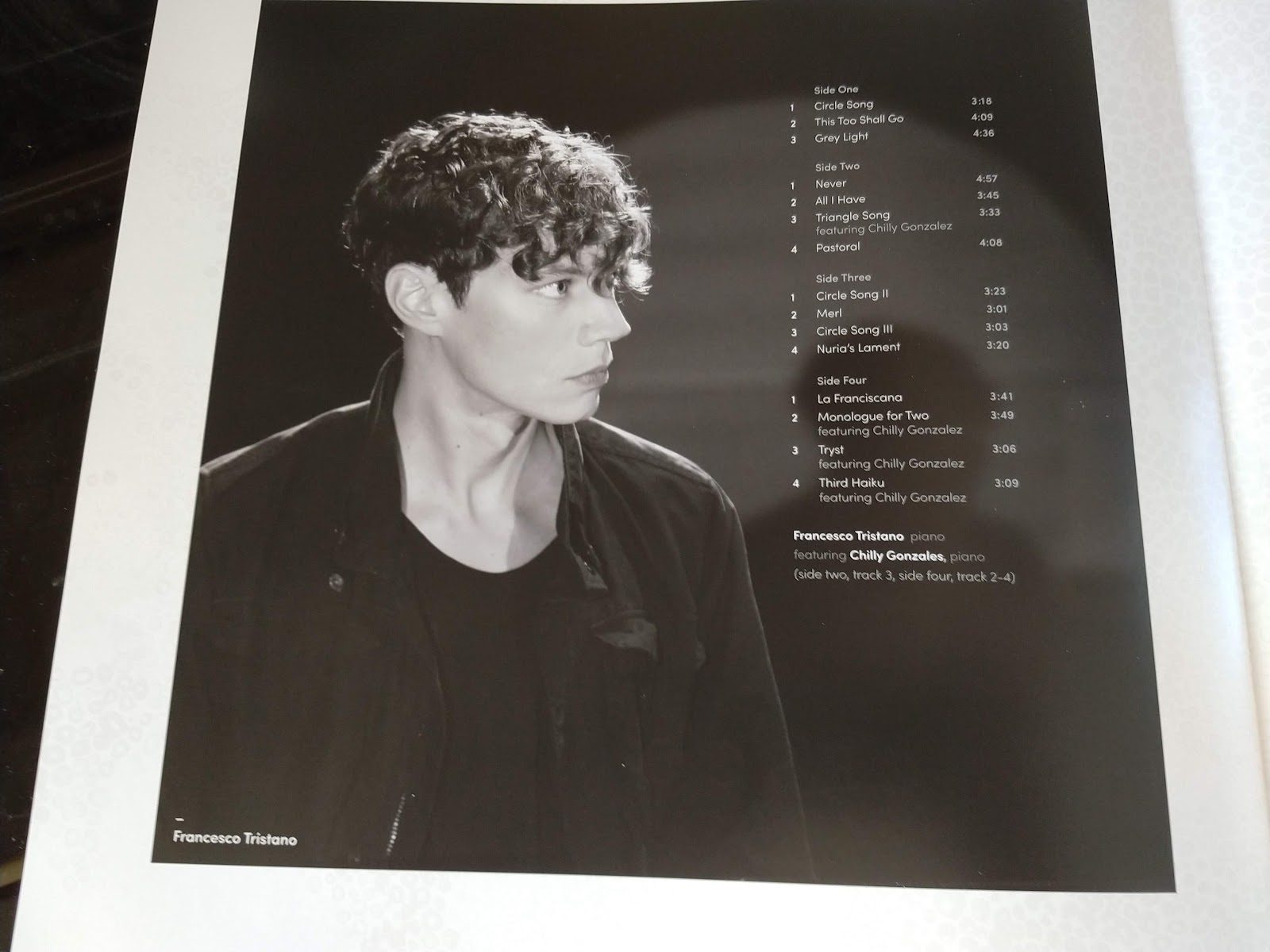
Francesco Tristano - Piano Circle Songs
Original composition for a classical musician must be a hard to break into and make a living from, aside from making a fortune! On this 2017 180g Double LP on Black Vinyl with information booklet inside and studio photos, Francesco Tristano has made a good go of it.
I'm a sucker for mellow and laid back piano-only music and he does demonstrates from this album that he can certainly compose and create interesting music. Chilly Gonzales has been roped in to help with some of the tracks and you can certainly hear which ones, with his flamboyant flair!
It's an enjoyable listen - and listen you must, or you won't appreciate the craft, often interspersed with timely waits and anticipation of what's to come and where it's going. Sometimes it feels a bit like funeral music, but never dull. Interesting and experimental, haunting and smooth, I'm pleased I found this and it is an excellent addition to the collection.
Wiki
Francesco Tristano is a Luxembourg classical and experimental pianist and composer, who also plays the clarinet and was born in 1981. He composes both classical and electronic music. Here is a selection of beautiful, newly composed works for solo piano. 'Piano Circle Songs' features award-winning Canadian pianist and songwriter Chilly Gonzales on four of the tracks, of which Gonzales composed 'Tryst' himself for the album.
I'm a sucker for mellow and laid back piano-only music and he does demonstrates from this album that he can certainly compose and create interesting music. Chilly Gonzales has been roped in to help with some of the tracks and you can certainly hear which ones, with his flamboyant flair!
It's an enjoyable listen - and listen you must, or you won't appreciate the craft, often interspersed with timely waits and anticipation of what's to come and where it's going. Sometimes it feels a bit like funeral music, but never dull. Interesting and experimental, haunting and smooth, I'm pleased I found this and it is an excellent addition to the collection.
Wiki
Francesco Tristano is a Luxembourg classical and experimental pianist and composer, who also plays the clarinet and was born in 1981. He composes both classical and electronic music. Here is a selection of beautiful, newly composed works for solo piano. 'Piano Circle Songs' features award-winning Canadian pianist and songwriter Chilly Gonzales on four of the tracks, of which Gonzales composed 'Tryst' himself for the album.
HaoHan Teapot
This far-too-cute HaoHan 800ml Teapot is made of glass. And thin glass, too! Don't let your ham-fisted spouse wash it up! The main attraction here is that it's dainty, pretty, light and you can see through it! It's almost like an ornament. Perhaps it is!
Although the unit looks incredibly delicate, it can be used as an ordinary teapot, so remove the infuser, put the (very thin) food-grade stainless steel lid back on with your tea-bags dumped inside. Or use it to infuse! Put that steel infuser back down the middle and put some of your lovely teas or fruit teas or even fruit - however you want to make tea, you just can.
The other thing to say is that it can be used on direct heat sources - so gas or electric hobs, stoves, aga cookers or even a campfire (though I can't see it surviving the ruck-sack)! It can be used in the microwave (without the metal bits) and despite the apparent delicacy, it's very sturdy and robust.
The main attraction here though is the novelty, I think. The glass is so thin and it's so light (without tea in it!) that it really does feel like it should be in a glass cabinet! A lovely item and a good idea for adding to that xmas list for those people who, every year, you have no idea what to get for! £12 at AmazonUK (https://goo.gl/QFyRTH)
Although the unit looks incredibly delicate, it can be used as an ordinary teapot, so remove the infuser, put the (very thin) food-grade stainless steel lid back on with your tea-bags dumped inside. Or use it to infuse! Put that steel infuser back down the middle and put some of your lovely teas or fruit teas or even fruit - however you want to make tea, you just can.
The other thing to say is that it can be used on direct heat sources - so gas or electric hobs, stoves, aga cookers or even a campfire (though I can't see it surviving the ruck-sack)! It can be used in the microwave (without the metal bits) and despite the apparent delicacy, it's very sturdy and robust.
The main attraction here though is the novelty, I think. The glass is so thin and it's so light (without tea in it!) that it really does feel like it should be in a glass cabinet! A lovely item and a good idea for adding to that xmas list for those people who, every year, you have no idea what to get for! £12 at AmazonUK (https://goo.gl/QFyRTH)
Julie London - Around Midnight
As one of the jazz-based 'whisperer' singers of the 1950's and 60's, Julie London (1926-2000) enjoyed a rich career making music and films. This 180g Black Vinyl LP originally released in 1960, now comes along again and is a blend of songs from her catalogue with a theme of nighttime. It's presented here in a simple sleeve with loads of notes about her and her career on the back.
The sound is amazingly laid back and sultry, softly delivered direct from a smoke-filled jazz club cellar or two! The orchestral arrangements are uplifting and big band depict the era, and before. The backing vocals are perfectly delivered, as is the sympathetic piano and brass support. Love it. Recommended for those who like old fashioned delightful songs, tunes and singing.
Wiki
Her 35-year acting career began in film in 1944, and included roles as the female lead in numerous Westerns, co-starring with Rock Hudson in The Fat Man (1951), with Robert Taylor and John Cassavetes in Saddle the Wind (1958), and opposite Robert Mitchum in The Wonderful Country (1959). In the 1950s and 60's she released a total of 32 albums of pop and jazz with her signature song being "Cry Me a River", which she introduced in 1955. London was noted by critics for her husky, smoky voice and languid vocal style. She released her final studio album in 1969, but achieved continuing success playing the female starring role of Nurse Dixie McCall, in the television series Emergency! (1972–79), in which she appeared opposite her real-life husband, Bobby Troup. The show was produced by her ex-husband, Jack Webb.
The sound is amazingly laid back and sultry, softly delivered direct from a smoke-filled jazz club cellar or two! The orchestral arrangements are uplifting and big band depict the era, and before. The backing vocals are perfectly delivered, as is the sympathetic piano and brass support. Love it. Recommended for those who like old fashioned delightful songs, tunes and singing.
Wiki
Her 35-year acting career began in film in 1944, and included roles as the female lead in numerous Westerns, co-starring with Rock Hudson in The Fat Man (1951), with Robert Taylor and John Cassavetes in Saddle the Wind (1958), and opposite Robert Mitchum in The Wonderful Country (1959). In the 1950s and 60's she released a total of 32 albums of pop and jazz with her signature song being "Cry Me a River", which she introduced in 1955. London was noted by critics for her husky, smoky voice and languid vocal style. She released her final studio album in 1969, but achieved continuing success playing the female starring role of Nurse Dixie McCall, in the television series Emergency! (1972–79), in which she appeared opposite her real-life husband, Bobby Troup. The show was produced by her ex-husband, Jack Webb.
Monday, 15 October 2018
David Bowie - Low
Like Heroes, I was very pleased to snag this 180g Remastered Vinyl LP to replace my aged and knackered original. Presented in original sleeve and inner information leaflet, it's great to have it back. There are some great tracks which I love, apart from the hit single Sound and Vision. Warsawa is my favourite, I think!
Like Heroes, it's full of experimental style and sounds, depicting that Berlin era which is oft' mentioned. It is for those who are open-minded about the nature of music and who are interested in musical development over same-old, same-old. Love it!
Wiki
The 11th studio album by David Bowie, released in January 1977. Recorded following Bowie's move to West Berlin after a period of drug addiction and personal instability, Low became the first of three collaborations with musician Brian Eno and producer Tony Visconti, later termed the "Berlin Trilogy". The album was in fact recorded largely in France, and marked a shift in Bowie's musical style toward an electronic and avant-garde approach that would be further explored on subsequent albums "Heroes" (1977) and Lodger (1979). Though it was initially met with mixed critical reviews, Low has since become widely acclaimed as one of Bowie's best and most influential works.
Like Heroes, it's full of experimental style and sounds, depicting that Berlin era which is oft' mentioned. It is for those who are open-minded about the nature of music and who are interested in musical development over same-old, same-old. Love it!
Wiki
The 11th studio album by David Bowie, released in January 1977. Recorded following Bowie's move to West Berlin after a period of drug addiction and personal instability, Low became the first of three collaborations with musician Brian Eno and producer Tony Visconti, later termed the "Berlin Trilogy". The album was in fact recorded largely in France, and marked a shift in Bowie's musical style toward an electronic and avant-garde approach that would be further explored on subsequent albums "Heroes" (1977) and Lodger (1979). Though it was initially met with mixed critical reviews, Low has since become widely acclaimed as one of Bowie's best and most influential works.
David Bowie - Heroes
I was very pleased eventually to replace my very old and worn out Heroes LP with this new remaster on 180g Black Vinyl with lyrics sheet inside. It's a fabulous album, just at the right time for me, in my formative years back then. The whole Berlin thing is fascinating to me and music enlightening.
There's obviously the hit single title track, but so much more for those willing to open their ears! Some of the experimentation with sound and vocals is quite superb and innovative, particularly on Side 2. Recommended for those who are open-minded.
Wiki
Heroes is the 12th studio album by David Bowie, October 1977. This second installment of his Berlin Trilogy recorded with Brian Eno and Tony Visconti, continued the ambient experiments of his previous album Low and featured the contributions of King Crimson guitarist Robert Fripp. Of the three albums, it was the only one wholly recorded in Berlin.
There's obviously the hit single title track, but so much more for those willing to open their ears! Some of the experimentation with sound and vocals is quite superb and innovative, particularly on Side 2. Recommended for those who are open-minded.
Wiki
Heroes is the 12th studio album by David Bowie, October 1977. This second installment of his Berlin Trilogy recorded with Brian Eno and Tony Visconti, continued the ambient experiments of his previous album Low and featured the contributions of King Crimson guitarist Robert Fripp. Of the three albums, it was the only one wholly recorded in Berlin.
Subscribe to:
Posts (Atom)
Frontier Crucible (2025)
This is a low-budget Western rather than a major studio feature and certainly a slow-burner for most of its two-hour runtime. Apparently, th...
-
I am the proud owner of the Motorola Edge 50 Neo and reviewed it here on my Blog Motorola Edge 50 Neo in 2024 and love/d the dinky littl...
-
Before I get to the ThinkPhone25 vs Moto Edge 50 Neo comparison, I thought I'd do the more logical bunch of thoughts, that being the Edg...
-
The G86 is, surprise, surprise, Motorola's update to the G85! My interest was piqued because on the spec-sheet at least, the updates do ...